About this architecture
Most retailers and manufacturers buy a PIM system for product content, then need that content in an ERP, an online store, search, planning and stores, each with its own interface and timing. This example models a product master integration around inriver PIM on Azure, combining queues, events, APIs and nightly files.
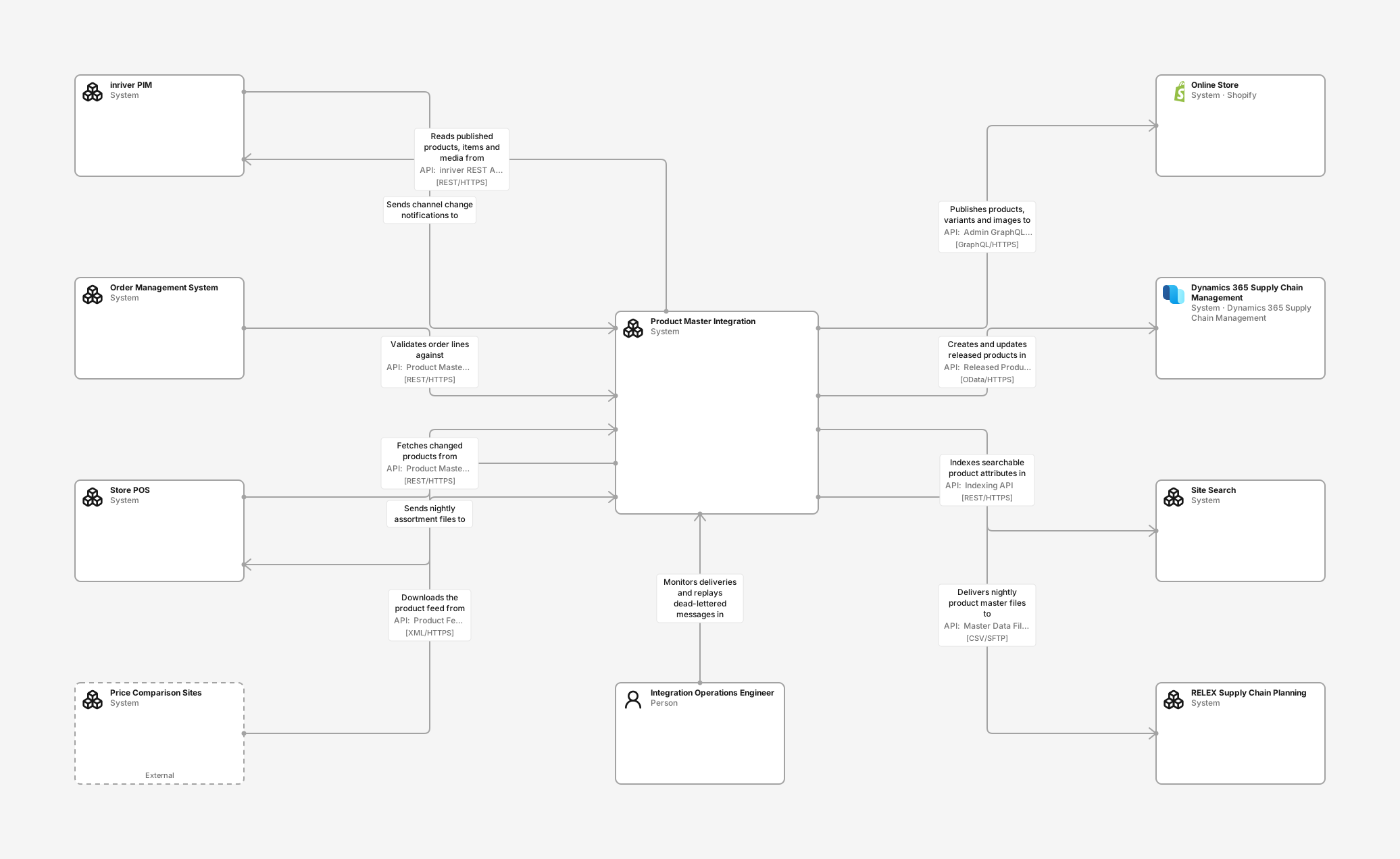
System context diagram
See which systems get product data from the product master: ERP, online store, site search, planning, stores and order management, with inriver PIM as the source.
- inriver PIM (Software system): Software-as-a-service product information management platform, hosted by inriver. Product data specialists enrich products there and publish them to channels.
- Order Management System (Software system): Orchestrates orders across online and store channels and validates order lines against the product master.
- Store POS (Software system): Point-of-sale system in physical stores. Needs item names, barcodes and shelf-label data.
- Price Comparison Sites (Software system): Third-party sites, such as Prisjakt and PriceRunner, that list products from a published feed.
- Integration Operations Engineer (Person): Watches product deliveries, handles alerts and replays dead-lettered messages.
- Product Master Integration (Software system): Reads published product information from inriver, keeps the company's product master and distributes changes to every system that sells, plans or ships products.
- Online Store (Shopify): Shopify store that presents the assortment, product pages and images to consumers.
- Dynamics 365 Supply Chain Management (Dynamics 365 Supply Chain Management): ERP that owns released products, purchasing, inventory and invoicing. An item must exist here before it can be bought or sold.
- Site Search (Software system): Hosted search and filtering service behind the online store's search box and category pages.
- RELEX Supply Chain Planning (Software system): Software-as-a-service forecasting and replenishment. Needs the product hierarchy, pack sizes and supplier links.
Integration containers diagram
Follow a product change from inriver through a queue, an import worker and an event topic to one publisher per target, plus APIs and nightly files. Step through four flows, including an ERP replay and nightly reconciliation.
- inriver PIM (Software system): Software-as-a-service product information management platform, hosted by inriver. Product data specialists enrich products there and publish them to channels.
- Order Management System (Software system): Orchestrates orders across online and store channels and validates order lines against the product master.
- Store POS (Software system): Point-of-sale system in physical stores. Needs item names, barcodes and shelf-label data.
- Price Comparison Sites (Software system): Third-party sites, such as Prisjakt and PriceRunner, that list products from a published feed.
- Product Change Notifier (C#): inriver Connect extension written in C#, owned by the Integration Platform team. Listens for channel and entity events and posts a small change notification; it never sends product data.
- Change Notification Queue (Azure Service Bus): Service Bus queue with duplicate detection on entity ID and modified time. Absorbs bursts when a whole channel is republished.
- Product Master API (Azure Container Apps Environment): Read-only REST API for products, variants, barcodes and media references, with look-ups and delta queries. Runs in Azure Container Apps.
- Legacy POS File Export (.NET): Nightly flat-file export of the whole assortment to the store POS. Retired store by store as the POS moves to delta look-ups in the Product Master API.
- Integration Gateway (Azure API Management): Azure API Management. Authenticates the notifier and internal consumers, applies rate limits and routes calls to the queue and the Product Master API.
- Product Import Worker (Azure Functions): Azure Function. Skips entities whose stored version is current, reads changed ones from inriver within its concurrency limit, maps them to the canonical product model and stores them with an outbox event.
- Product Master Database (Azure SQL Database): Azure SQL database with canonical products, variants, identifiers, classifications and media references, plus the outbox of published changes.
- Price Comparison Feed (Azure Functions): Planned Azure Function that generates a product feed in Blob Storage for price comparison sites.
- Reconciliation Job (Azure Data Factory): Nightly Data Factory pipeline that lists every channel entity in inriver and re-queues it, so the import worker can repair anything a notification missed.
- Product Events (Azure Service Bus): Service Bus topic of ProductChanged events. Each consumer has its own subscription, with sessions per product for ordered delivery and a dead-letter queue.
- Planning Feed Exporter (Azure Data Factory): Nightly Data Factory pipeline that writes the product hierarchy, pack sizes and supplier links as files to RELEX.
- Commerce Catalog Publisher (Azure Functions): Azure Function that updates products, variants and image links in the online store.
- ERP Item Publisher (Azure Functions): Azure Function that creates and updates released products and variants in Dynamics 365 through OData.
- Search Index Publisher (Azure Functions): Azure Function that pushes searchable attributes and facets to the search index in batches.
- Online Store (Shopify): Shopify store that presents the assortment, product pages and images to consumers.
- Dynamics 365 Supply Chain Management (Dynamics 365 Supply Chain Management): ERP that owns released products, purchasing, inventory and invoicing. An item must exist here before it can be bought or sold.
- Site Search (Software system): Hosted search and filtering service behind the online store's search box and category pages.
- RELEX Supply Chain Planning (Software system): Software-as-a-service forecasting and replenishment. Needs the product hierarchy, pack sizes and supplier links.
inriver PIM diagram
See the parts of inriver a buying customer uses and integrates with: Enrich, the REST API, the extension host, media CDN, supplier onboarding, Syndicate and Evaluate.
- Supplier (Person): Submits data and images for new and changed products through the supplier portal.
- Product Data Specialist (Person): Enriches product copy, attributes, media and translations in inriver and publishes products to sales channels.
- Content Onboarding (Container): Supplier portal where incoming product data and images are mapped and validated before they reach Enrich.
- inriver Enrich (Container): Browser workspace where specialists enrich products, items and resources, check completeness and publish channels.
- Media CDN (Container): Stores product images and documents as resources and serves them from public CDN URLs that the store links to.
- inriver REST API (Container): Versioned REST API authenticated with an X-inRiver-APIKey header created in Control Center. Allows ten concurrent requests per environment and IP address.
- Connect Extension Host (Container): Runs customer extensions inside inriver, such as entity and channel listeners and scheduled extensions. Extensions are configured in Control Center.
- Evaluate (Container): Digital shelf analytics: monitors how products appear on retailer sites and scores content quality.
- Syndicate Advance (Container): Maps channel content to each marketplace's format and delivers the listings.
- Product Master Integration (Software system): Reads published product information from inriver, keeps the company's product master and distributes changes to every system that sells, plans or ships products.
- Retail Marketplaces (Software system): Marketplaces, such as Amazon and Zalando, that receive listings directly from inriver Syndicate.
inriver from the buying customer's perspective
inriver is a software-as-a-service PIM system, hosted by the vendor. The inriver view does not describe how inriver works internally. It shows the parts a customer uses and integrates with: the Enrich workspace, the REST API with its API key and concurrency limit, the Connect extension host, the media CDN, Content Onboarding for suppliers, Syndicate Advance for marketplaces, and Evaluate for digital shelf analytics.
Drawing containers for a system you buy goes beyond the usual C4 practice of treating external systems as black boxes. It is deliberate: integration teams need to know which part of the product they connect to, which limits apply, and which features already cover a channel. Marketplaces, for example, are served by Syndicate, not by the integration.
How product changes travel
A Connect extension written by the integration team runs inside inriver and posts a small notification when a channel is published. The notification carries IDs only. API Management authenticates it and puts it on a Service Bus queue, which absorbs bursts and removes duplicates. An import worker then reads the full product from the inriver REST API, within inriver's limit of ten concurrent requests, and stores a new version with an outbox record in the product master database.
Each change is published once as a ProductChanged event on a Service Bus topic. Every target has its own subscription and publisher: Dynamics 365 through OData, the Shopify store through its Admin GraphQL API, and site search through its indexing API. A failing target only stops its own subscription, and its messages wait in a dead-letter queue until they are replayed.
Not everything needs events. The order management system and the store POS look up products synchronously in the Product Master API, through the same gateway. RELEX receives nightly files over SFTP, and a nightly reconciliation compares the product master with inriver and re-queues anything that was missed. A legacy POS file export is marked deprecated, and a price comparison feed is planned.
Ownership, operations and deployment
Five teams own the systems, from Product Information for inriver to Integration Platform for the product master. Attributes record each integration's ID, pattern, agreed latency and runbook, and each system's business criticality and personal data, so model maps can group the landscape by team, pattern or criticality.
Production and Test run in Azure Sweden Central with separate tiers. inriver production and test tenants host the vendor's parts and the notifier extension, and the legacy export still runs on a Windows server in the store data centre.
What you get in Revision
Creating the example adds the three diagrams, nine API definitions, five flows, deployment data for Production and Test, team ownership and attribute values to a new editable Draft. Teams and attributes that already exist with the same names are reused. Editors reuse existing teams, while workspace admins also create the missing ones. The Azure, Business Applications and Core Technologies packs must be enabled; the start flow enables them.
The example is illustrative. The inriver details reflect publicly available descriptions of the product; verify limits, module names and extension types against your own inriver contract and documentation.
Adapt it to your system
- Replace inriver with your PIM system and redraw its customer-facing parts.
- Replace the targets with the systems that need product data in your organisation, and decide per target between events, API look-ups and files.
- Review the retry, dead-letter and reconciliation choices against your latency agreements.
- Map the teams and attributes to your own, then adapt the Azure tiers and environments before merging the Draft.
New to C4? Read the C4 model guide.