About this architecture
An internet banking service needs to explain the same system to customers, developers and operations teams. This example connects three levels of detail in one model, so you can move from the big picture to the internals of the API application.
System context diagram
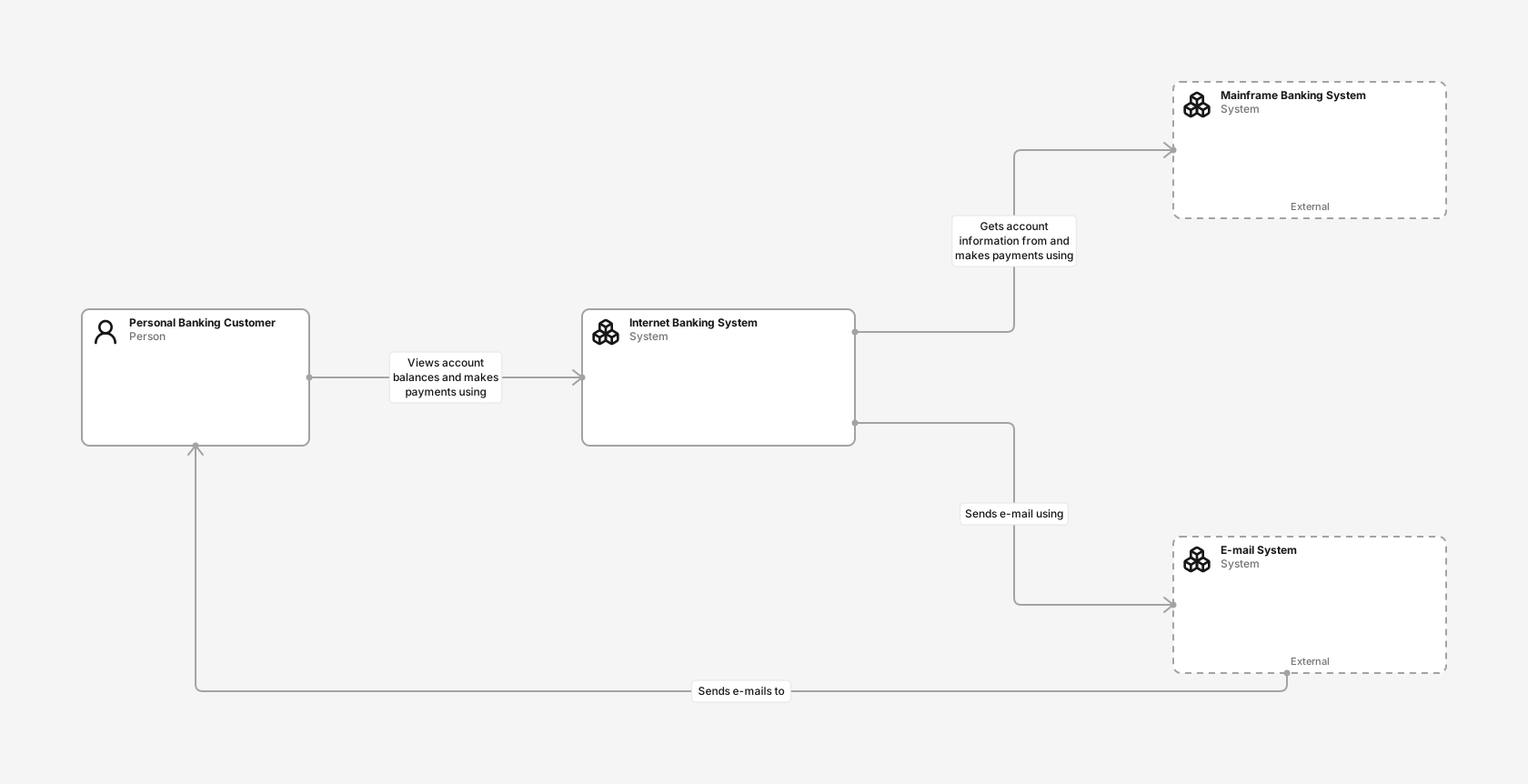
See the banking customer, the internet banking system and its connections to the mainframe and email systems.
- Personal Banking Customer (Person): A customer of the bank with personal bank accounts who uses the system.
- Internet Banking System (Software system): Allows customers to view account balances and make payments.
- Mainframe Banking System (Software system): Stores the core banking information about customers, accounts and transactions.
- E-mail System (Software system): Sends e-mails to customers.
Containers diagram
Follow requests from the web and mobile applications through the API application to the database and external systems, with flows for website sign-in and mobile payments.
- Personal Banking Customer (Person): A customer of the bank with personal bank accounts who uses the system.
- Web Application (Container): Java and Spring MVC application that delivers the single-page application.
- Single-Page Application (Container): JavaScript and Angular application that provides Internet banking in the browser.
- Mobile App (Container): Xamarin mobile application that provides Internet banking on mobile devices.
- API Application (Container): Java and Spring MVC application that provides Internet banking functionality via JSON/HTTPS APIs.
- Database (Container): Oracle database schema that stores users, hashed authentication credentials and access logs.
- Mainframe Banking System (Software system): Stores the core banking information about customers, accounts and transactions.
- E-mail System (Software system): Sends e-mails to customers.
Components diagram
Follow browser requests inside the API application: sign-in, account summaries, payments and password resets use shared security, mainframe and email components.
- Single-Page Application (Container): JavaScript and Angular application that provides Internet banking in the browser.
- Sign In Controller (Component): Allows users to sign in.
- Accounts Summary Controller (Component): Provides customers with a summary of their bank accounts.
- Payments Controller (Component): Allows customers to make payments from their accounts.
- Reset Password Controller (Component): Allows users to reset their passwords with a one-time link.
- Security Component (Component): Provides functionality related to signing in, changing passwords and related concerns.
- Mainframe Banking System Facade (Component): A facade onto the mainframe banking system.
- E-mail Component (Component): Sends e-mails using the external e-mail system.
- Database (Container): Oracle database schema that stores users, hashed authentication credentials and access logs.
- Mainframe Banking System (Software system): Stores the core banking information about customers, accounts and transactions.
- E-mail System (Software system): Sends e-mails to customers.
How the banking system fits together
Customers check balances and make payments using browser and mobile applications. The internet banking system depends on an existing mainframe for core account and transaction information, and on a separate email system for customer messages.
The system context view describes these people and systems. It establishes the boundary of the internet banking service before introducing its implementation details.
From applications to API components
The container view separates the web application, single-page application, mobile application, API application and database. Labeled relationships show which applications communicate and how requests cross the system boundary.
The component view focuses on the API application. Sign-in, account summary, payment and password reset controllers depend on security, mainframe facade and email components; the payments controller is an addition to the original example. The browser client represents the incoming requests in this view; the mobile app uses the same controllers and remains visible in the container view. All components retain their identity across the linked model views.
Flows trace business processes step by step. On the container view, a customer signs in on the website and makes a payment from the mobile app. On the component view, a browser payment passes through the payments controller and mainframe facade, and a forgotten password is reset with a one-time email link.
What you get in Revision
The example includes all three diagram views, four flows and deployment data for Production and Test. Production uses customer devices, a bank data centre (DC), redundant web and API tiers, and primary/standby Oracle databases; Test uses QA devices, single servers and a separate database with synthetic data. These deployment choices are illustrative adaptations, rather than claims about the original banking example. Creating the example adds an editable copy in a new Draft and tags its model elements and views.
This is an educational architecture example, adapted from the C4 model example. Its Java, Angular, Xamarin and Oracle descriptions illustrate responsibilities; they are not recommendations for a new banking implementation.
Adapt it to your system
- Rename the systems and applications to match your domain.
- Replace the example’s technology descriptions with your own stack.
- Review external dependencies and redraw the trust boundaries relevant to your system.
- Connect Test to a mainframe test region and a test email sink. Adapt the deployment data to your environments, then review the Draft before merging.
New to C4? Read the C4 model guide.
Adapted from Simon Brown’s C4 model example. Licensed under CC BY 4.0; adapted to Revision’s model and diagram presentation.