About this architecture
A commerce platform has both interactive requests and work that can happen after checkout. This example separates the storefront and APIs from asynchronous fulfilment, using Azure services to illustrate the production deployment.
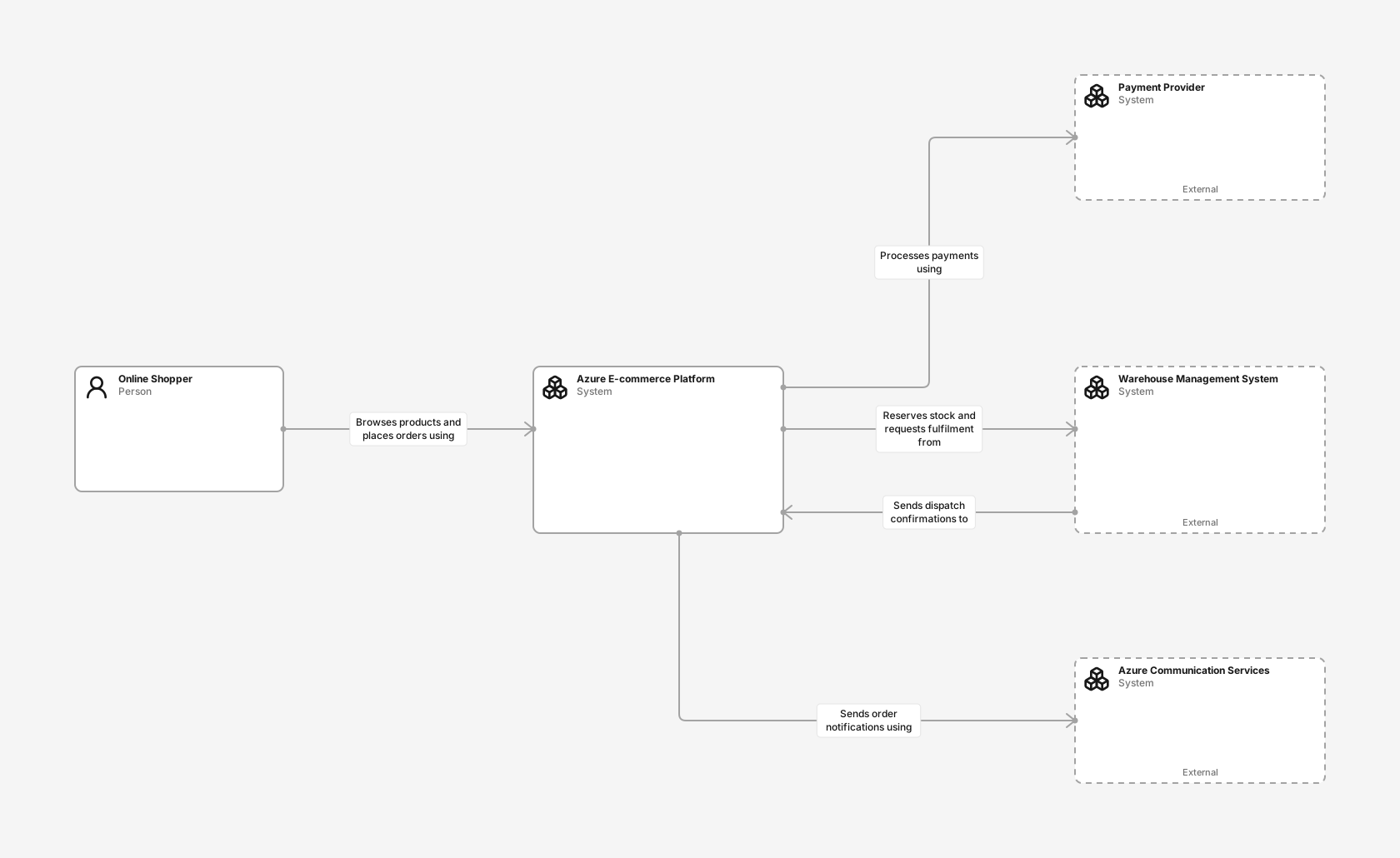
System context diagram
See how the commerce platform connects shoppers to payment, warehouse and email systems, including dispatch confirmations sent back by the warehouse.
- Online Shopper (Person): A customer who browses products, checks out and tracks orders.
- Azure E-commerce Platform (Software system): Lets customers discover products, place orders and track fulfilment using Azure-managed services.
- Payment Provider (Software system): Authorises and captures customer payments.
- Warehouse Management System (Software system): Manages stock reservations, picking and dispatch, and confirms shipments back to the platform.
- Azure Communication Services (Software system): Microsoft-managed service that delivers transactional order notifications.
Containers diagram
Trace catalog and checkout requests through the commerce API, and step through the checkout and dispatch confirmation flows.
- Online Shopper (Person): A customer who browses products, checks out and tracks orders.
- Web Storefront (Azure Front Door): A static web frontend hosted in Azure Storage and delivered through Azure Front Door. Presents the product catalog and checkout journey.
- API Gateway (Azure API Management): Azure API Management exposes and protects the commerce APIs used by the storefront.
- Catalog Service (Container): A container app that provides product, category, pricing and availability information.
- Order Service (Container): A container app that coordinates checkout, payment and order status before publishing fulfilment work.
- Commerce Database (Azure SQL Database): An Azure SQL database that stores product and order data.
- Payment Provider (Software system): Authorises and captures customer payments.
- Order Events (Azure Service Bus): An Azure Service Bus topic that decouples checkout from fulfilment and notifications.
- Fulfilment Worker (Azure Functions): An Azure Function that handles order events, reserves stock and sends confirmations.
- Warehouse Management System (Software system): Manages stock reservations, picking and dispatch, and confirms shipments back to the platform.
- Azure Communication Services (Software system): Microsoft-managed service that delivers transactional order notifications.
The request and order flows
A shopper browses the storefront and places an order. The commerce API routes catalog and checkout requests to separate catalog and order services. The services read and write the application database, while the order service communicates with an external payment provider.
The checkout flow follows one order step by step. The order service re-prices the basket, stores it under an idempotency key and only authorises the payment. It then publishes an order event to a Service Bus topic, and a fulfilment worker reserves stock in the warehouse system, with retries and a dead-letter queue for failures. This separates the checkout request from downstream work.
The dispatch confirmation flow runs in the other direction. The warehouse calls a webhook through the commerce API when a parcel leaves, the order service captures payment for the shipped lines, and the fulfilment worker sends the shopper a shipping email with tracking details.
How Azure supports the deployment
The deployment uses the Azure West Europe region (WEU). The production deployment data hosts the storefront in Azure Storage with delivery through Azure Front Door, places API entry at API Management, application services in a Container Apps environment, the fulfilment worker in Azure Functions, order events in Service Bus, and data in Azure SQL. Production uses a minimum of two application replicas, a Premium Service Bus namespace and a zone-redundant database. Test uses a separate subscription, reduced capacity, synthetic data and is intended for sandbox integrations.
The container diagram describes application responsibilities and communication. The deployment data records where those parts run; an application container is a C4 abstraction and does not imply a Docker container.
What to review for your own platform
The example is an illustrative starting point for architecture discussions. It does not specify a complete production design for payment compliance, disaster recovery, data residency or operational security.
The flows show one approach to duplicate requests and messages. Before adopting the pattern, decide how you handle failed payments, stock reservation conflicts, partial shipments and dead-lettered messages. Document those decisions alongside the model, and adapt service boundaries to the actual responsibilities of your team.
What you get in Revision
Creating the example adds both diagram views, API definitions, relationships, the checkout and dispatch flows, and separate Production and Test deployment data to a new editable Draft. The Azure technology pack must be enabled in the target workspace; the start flow checks this before creating the copy.
Adapt it to your system
- Replace the payment, warehouse and email dependencies with your providers.
- Adapt API boundaries and service names to your domain.
- Replace the idempotency, retry and dead-letter choices in the flows with your own failure handling.
- Connect Test to payment and warehouse sandboxes and a test email sink. Adjust the Azure deployment and environment names, then review the Draft before merging.
New to C4? Read the C4 model guide.