Manage Attributes
/api/external/attributes, /api/external/attributes/:id
Info
This API requires authentication with an API key. See our API Authentication article for more details.
The attributes API allows for fetching, creating, and updating a workspace's attributes.
List All Attributes
Retrieve a list of all attributes.
GET https://your-workspace.revision.app/api/external/attributesThis returns a JSON response with an array of all of your attributes, following this example structure:
[
  {
    "id": "5cW9LmzRZcu",
    "name": "Demo",
    "desc": "This is a documentation demo attribute.",
    "type": "LIST",
    "list": ["First", "Second", "Third"],
    "required": false
  },
  {
    "id": "NvYE1OdMJGw3",
    "name": "Other Demo Attribute",
    "desc": null,
    "type": "LINK",
    "required": true,
    "apiContext": "2026-01-01 01:01:01"
  }
]
Get Attribute
Retrieve a specific attribute by ID.
GET https://your-workspace.revision.app/api/external/attributes/{id}This returns a JSON response with the attribute:
{
  "id": "5cW9LmzRZcu",
  "name": "Demo",
  "desc": "This is a documentation demo attribute.",
  "type": "LIST",
  "list": ["First", "Second", "Third"],
  "required": false
}
Create Attribute
Create a new attribute.
POST https://your-workspace.revision.app/api/external/attributesExample of creating a new attribute:
{
  "name": "Environment",
  "desc": "Deployment environment for the component",
  "type": "LIST",
  "list": ["Development", "Staging", "Production"],
  "required": true
}
Update Attribute
Update an existing attribute.
PATCH https://your-workspace.revision.app/api/external/attributes/{id}Example of updating an existing attribute:
{
  "name": "Updated Environment",
  "desc": "Enhanced environment attribute with more options",
  "type": "LIST",
  "list": ["Dev", "Test", "Staging", "Prod", "DR"],
  "required": false
}
Partial Updates
When updating, you only need to send the fields you want to change. Omitted fields remain unchanged. Set a field to null to clear its value.
Upsert Batch Attributes
Create or update multiple attributes in a single batch operation.
PATCH https://your-workspace.revision.app/api/external/attributes/upsert-batchExample of upserting multiple attributes:
[
  {
    "name": "Environment",
    "type": "LIST",
    "list": ["Production", "Staging", "Development"],
    "required": true
  },
  {
    "id": "5cW9LmzRZcu",
    "name": "Updated Demo",
    "desc": "This is an updated documentation demo attribute.",
    "type": "LIST",
    "list": ["First", "Second", "Third"],
    "required": false
  },
  {
    "name": "Owner",
    "type": "STRING",
    "required": false
  }
]
Tip
In batch operations, include an id to update an existing attribute, or omit it to create a new one.
Tip
Assigning attributes to components and setting values is done through the Components API. See the Attributes core concept for detailed information about attribute types and usage.
Delete Attribute
Not Implemented
This endpoint is not yet implemented and will return a 501 status code.
DELETE https://your-organization.revision.app/api/external/attributes/{id}Data Types
| Value | Description |
|---|---|
id?: string | System-generated ID. Use this to update existing attributes. |
name: string | The attribute's name. |
type: enum | The attribute's type: STRING | NUMBER | BOOLEAN | LINK | USERLIST | LIST. |
desc?: string | Optional description of the attribute. |
required?: boolean | Whether this attribute is required. Defaults to false. |
apiContext?: string | Optional tracking field. Defaults to current timestamp in format 2026-01-01 01:01:01. |
list?: string[] | Required when type is LIST. Array of possible list options. |
forTypes?: string[] | Optional array of type IDs. Restricts this attribute to only components of the specified types. |
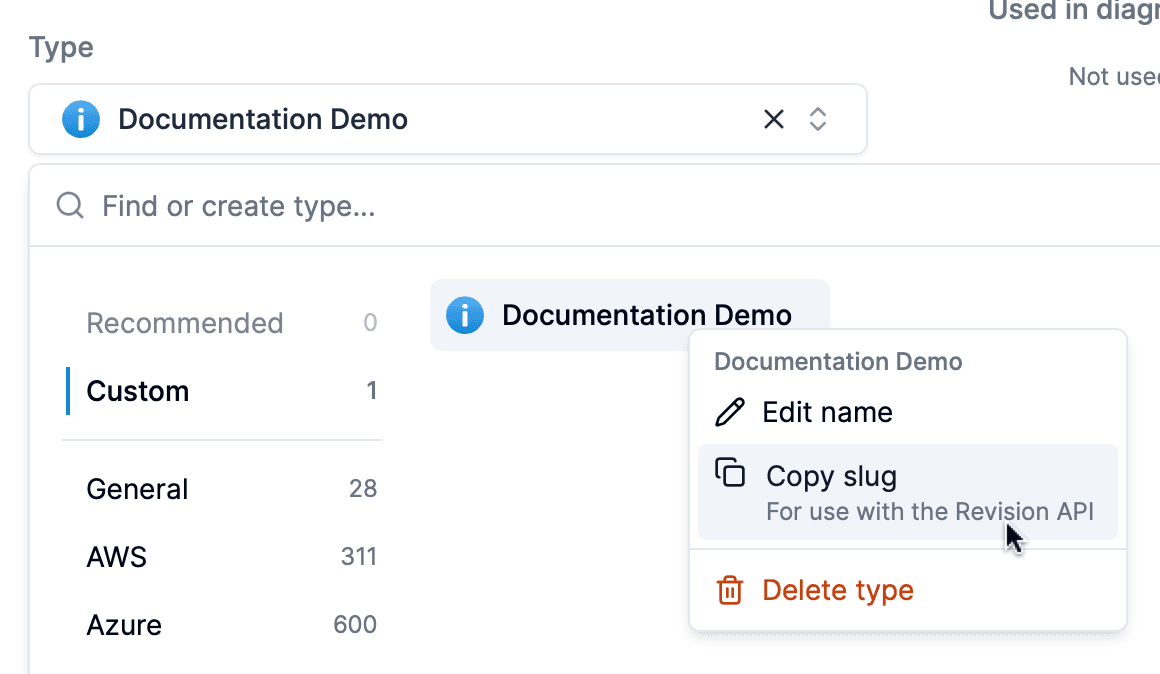
Tip
You can find type IDs by right-clicking types in the type selector.
Examples
Creating a new attribute
curl -X POST https://your-workspace.revision.app/api/external/attributes \
  -H "Content-Type: application/json" \
  -H "Authorization: Bearer your-api-key-here" \
  -d '{
    "name": "Environment",
    "desc": "Deployment environment for the component",
    "type": "LIST",
    "list": ["Development", "Staging", "Production"],
    "required": true
  }'
Getting an attribute by ID
curl -X GET https://your-workspace.revision.app/api/external/attributes/5cW9LmzRZcu \
  -H "Authorization: Bearer a0e08cad-184b-48a4-miku-14776a549b79"
Updating an existing attribute
curl -X PATCH https://your-workspace.revision.app/api/external/attributes/5cW9LmzRZcu \
  -H "Content-Type: application/json" \
  -H "Authorization: Bearer your-api-key-here" \
  -d '{
    "name": "Updated Environment",
    "desc": "Enhanced environment attribute with more options",
    "type": "LIST",
    "list": ["Dev", "Test", "Staging", "Prod", "DR"],
    "required": false
  }'
Upserting batch attributes
curl -X PATCH https://your-workspace.revision.app/api/external/attributes/upsert-batch \
  -H "Content-Type: application/json" \
  -H "Authorization: Bearer your-api-key-here" \
  -d '[
    {
      "name": "Environment",
      "type": "LIST",
      "list": ["Production", "Staging", "Development"],
      "required": true
    },
    {
      "id": "5cW9LmzRZcu",
      "name": "Updated Demo",
      "type": "LIST",
      "list": ["First", "Second", "Third"]
    }
  ]'
Manage Components
Complete API reference for managing components in Revision. Learn to fetch, create, and update architecture components with REST endpoints.
Manage Tags
API reference for managing tags in Revision. Learn to create, update, and organize architecture components using programmatic tag management.